

GetSlots Casino on Your Phone
What you get on mobile, what to check first, and how to start.
GetSlots Casino is built to work on a phone as well as it does on a desktop. You open the site in your mobile browser, log in, and the lobby fits your screen. Your balance, the cashier, your bonus progress and your game history carry over between devices, so you can start a session on a laptop and finish it on your phone. Before you install anything, know your two options: the mobile browser version, which needs no installation, and the Android app. The mobile browser version gets the same updates as the main site.
The game library on mobile is the same as on desktop. Gates of Olympus from Pragmatic Play and Starburst from NetEnt load in portrait mode, and the spin button sits where your thumb lands. Live tables from Evolution stream in the browser, so on mobile data you should keep an eye on your connection before you sit down at a table. The lobby also covers slots, live casino and poker, and filters let you narrow it down quickly on a small screen.
Money works the same way on every device. The cashier lists 12 payment methods, including Visa, Mastercard, Skrill and 5 cryptocurrencies such as Bitcoin and USDT. Amounts show in AUD for card and e-wallet payments. The minimum deposit is A$30, deposits are instant with no fee, and crypto carries only the network fee. New players can claim the welcome offer of a 100% match up to A$225 plus 150 free spins from the phone. The bonus carries 40x wagering and is valid for 30 days, and the free spins are valid for 7 days. Check these first, then activate it.
If something goes wrong, the operator's support team is available by live chat and email, and both work fine on a phone. For questions about this website you can write to [email protected]. The sections below cover setup, the features worth using on mobile, and the checks you should run before your first real-money session. Work through them in order and you will be set up in a few minutes.
Mobile Site vs App: Which One Suits You
A side-by-side check of both ways to play GetSlots Casino on your phone
You have two ways to reach GetSlots Casino on a phone. You can open the mobile site in your browser, or you can install the app. Both use the same account, the same balance and the same cashier, so you never have to pick one forever.
The difference is in how they handle daily use. The browser version needs no install and no storage space. You log in, play and close the tab. That is the right call if you play now and then, share a device, or keep your phone lean.
The app suits you if you play often. It sits on your home screen, opens faster after the first launch and keeps your session ready. Spins on Gates of Olympus or Book of Dead load the same way in both, because the games come straight from the studios' own servers either way. Live tables from Evolution stream in both too, but a steady connection matters more than the format you choose.
Payments work the same in both. All 12 payment methods, including 5 cryptocurrencies such as Bitcoin and USDT, are available from the cashier. Support stays the same too: live chat and email are reachable from either version.
Run through the table below before you decide. If two or more rows favour the app for your habits, install it. If not, bookmark the site and move on.
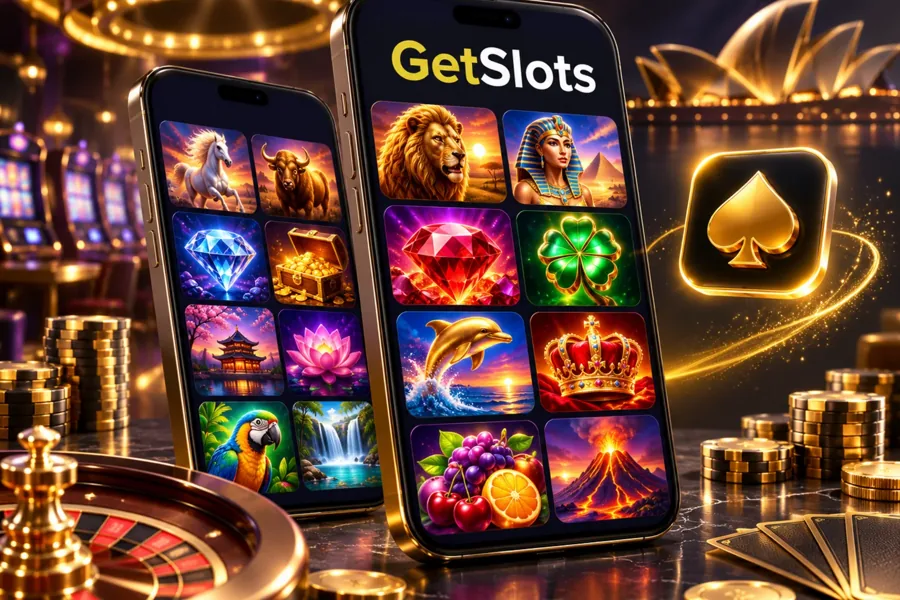
| Feature | Mobile site | App |
|---|---|---|
| Installation | None, open in any browser | One-time download and install |
| Storage on your phone | No space used | Takes some device storage |
| Access speed | Type the address or use a bookmark | One tap from the home screen |
| Login | Sign in each session unless the browser remembers you | Session stays ready between visits |
| Game library | Full slots and live casino range | Same full range |
| Cashier | All 12 methods, 5 of them crypto | Same 12 methods |
| Bonuses | 100% welcome bonus plus 150 free spins | Same offer, same terms |
| Updates | Automatic, nothing to do | Install updates when prompted |
| Support | Live chat and email | Live chat and email |
| Best for | Occasional play or shared devices | Regular play on your own phone |
Android Download: Getting GetSlots Casino on Your Phone
How to install the Android version safely and get playing in a few minutes.
The Android version of GetSlots Casino gives you the same lobby you get on desktop. You get slots from Pragmatic Play, NetEnt and Push Gaming, and live tables from Evolution. Gates of Olympus and Book of Dead load in portrait or landscape, and the cashier keeps all 12 payment methods available, including 5 cryptocurrencies.
Download it from the official GetSlots site only. Copies on third-party file sites can be outdated or tampered with, and you have no way to check what was changed. If a page offers you a 'modded' version with extra credits, close it.
Before you start, check three things. Your Android system should be up to date. You need enough free storage for the app and its game data. A stable Wi-Fi connection helps for the first download, because live dealer streams and slot assets are heavier than the app file itself.
Once it is installed, you log in with your existing account. Your balance, bonus progress and transaction history carry over. Nothing needs to be moved by hand. If you have not claimed the welcome offer of a 100% match plus 150 free spins yet, you can activate it from the app's promotions tab under the same terms as on desktop.
Open the official site
Visit GetSlots Casino in Chrome or your default Android browser and tap the app download button on this page.
Download the file
Confirm the download when your phone asks. Wait until it finishes fully before you open it.
Allow the install
If Android blocks the file, open Settings, find the option to install unknown apps and allow it for your browser only. Turn it off again once you are done.
Install and launch
Tap the downloaded file, select Install, then open the app from your home screen.
Log in or register
Sign in with your current details or create a new account, then set your deposit limits before your first top-up.
Get help if stuck
If the install fails, contact the operator's support through live chat or email. Have your phone model and Android version ready.
Installing GetSlots Casino on iOS
Put GetSlots Casino on your Home Screen through Safari in a few minutes.
On an iPhone or iPad you set GetSlots Casino up through Safari, not the App Store. You add the casino site to your Home Screen. It then gets its own icon and opens full screen, without the browser address bar.
You lose nothing by doing it this way. The lobby, the cashier and your account are the same ones you use on desktop. Your balance, open bonuses and game history all carry over, because everything runs on your existing account.
Before you start, check two things. Use Safari, because other iOS browsers do not always show the Home Screen option in the same place. Make sure your connection is stable, so the first load of the lobby finishes properly.
Once the icon is in place, test it. Open a lighter slot such as Starburst and confirm it loads and responds to taps. Then try a live table from Evolution so you know video streaming works on your network. If a game freezes, close the shortcut fully and open it again before you look for other causes.
Updates happen on their own. The shortcut always loads the current version of the site, so there is nothing to download and no update prompts to approve.
- Browser: Safari on iPhone or iPad
- No App Store download or Apple ID purchase needed
- Same account, balance and bonuses as on desktop
- Help: live chat or email at [email protected]
Open Safari
Start Safari and go to the GetSlots Casino website. Wait until the lobby has fully loaded.
Tap the Share button
Tap the square icon with the upward arrow. It sits at the bottom of the screen on iPhone and at the top on iPad.
Choose Add to Home Screen
Scroll down the share menu and tap Add to Home Screen. If you cannot see it, tap Edit Actions and switch it on.
Confirm the name
Keep the name GetSlots Casino or shorten it, then tap Add in the top corner.
Launch and log in
Tap the new icon on your Home Screen, log in once, and check that your balance shows correctly before you play.
Full App Features
What you get on your phone at GetSlots Casino, and what to check before you play.
Full slots library
The whole slots lobby works on mobile, with titles from Pragmatic Play, NetEnt and Push Gaming. Gates of Olympus and Book of Dead load in portrait or landscape. You can sort and search the lobby, so a specific game is two taps away.
Live dealer tables
Evolution streams its live tables straight to your screen. Bet buttons are sized for thumbs, and chat with the dealer stays open beside the stream. Use Wi-Fi for long sessions, because live video uses far more data than slots.
Cashier in your pocket
All 12 payment methods are in the mobile cashier, including Visa, Mastercard, Skrill and Neteller. The minimum deposit is A$30, deposits are instant and carry no fee, and crypto has only the network fee. Amounts show in AUD.
Crypto payments
5 cryptocurrencies are supported, Bitcoin, Ethereum, Litecoin, TRON and USDT among them. Copy the wallet address from the app and paste it in. Check the network before you send. A wrong network can cost you the funds.
Welcome offer on mobile
The 100% match and 150 free spins can be claimed from your phone. The wagering requirement is 40x, so you know the rules before you deposit, not after.
Support access
Live chat opens from the app menu, so you do not have to switch to a desktop. For anything that needs a paper trail, such as a verification query, use the operator's email support and keep the reply.
Account controls
Deposit limits, session reminders and account history sit in your profile settings. Set your limits on day one. It is a quick job and saves you from a bad night.
Poker tables
The same login gives you the poker tables, so you do not need a second account. Your balance is shared across products. Track where your money goes.
GetSlots Casino App Screenshots
Six screens you will use most, and what to check on each one.
Before you install anything, you should know what you are getting. These are the six screens you will see most often in the GetSlots Casino app, in the order a new player usually reaches them.
Each screen does one job. The lobby gets you to a game fast, the cashier handles your money and the account area keeps your history in one place. Nothing is hidden behind extra menus.
Look at the details as you go. Check that balances show in AUD, that the bonus terms open before you opt in, and that the support button is always within reach. If a screen looks different on your phone, update the app first and check again.
Home lobby
Your starting point. Featured titles like Gates of Olympus and Book of Dead sit at the top, with category tabs for slots, live casino and poker just below.
Slot game view
A game such as Starburst loads full screen in portrait or landscape. Bet size, spin and autoplay controls stay at the bottom where your thumb lands.
Live casino tables
Evolution tables stream with the bet panel under the video. Keep your stake within the A$5 maximum bet while a bonus is active.
Welcome offer
The 100% bonus with 150 free spins comes with 40x wagering, 30 days of bonus validity and 7 days of free spins validity, so know them before you claim, not after.
Cashier
All 12 payment methods are available here, including 5 cryptocurrencies such as Bitcoin and USDT alongside Visa and Skrill. The minimum deposit is A$30.
Support and account
Open live chat from any screen or write to [email protected]. Your deposit history, limits and verification status are on the same page.
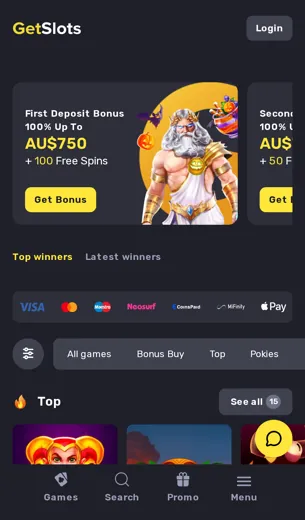 Casino game lobby
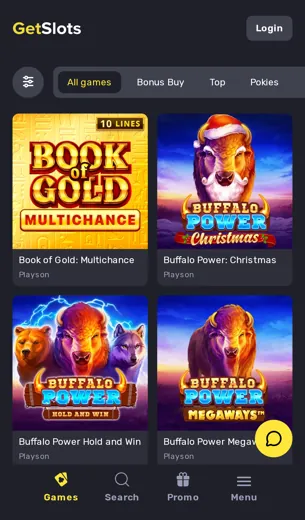 Game lobby
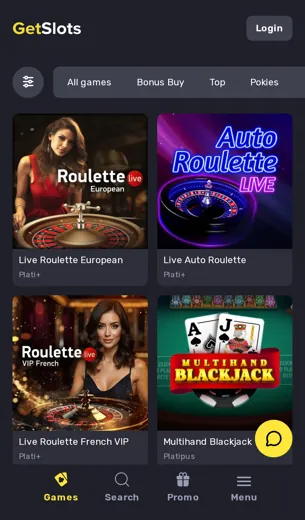 Live casino
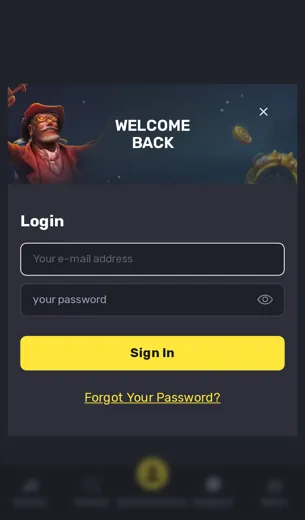 Account login screen
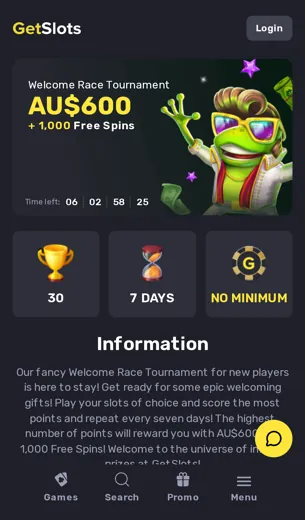 Tournament details page
Your First Deposit Bonus in the App
100% match plus 150 free spins, claimed from the app the same way as on desktop.
Your first deposit at GetSlots Casino comes with a 100% match bonus and 150 free spins. The app gives you the same welcome offer as the desktop site. There is no separate mobile version with different terms, so you can sign up on your phone and know exactly what you are getting.
Here is how it works. Register, open the cashier and pick a payment method. You have 12 options, including Visa, Mastercard, Skrill and Neteller, plus 5 cryptocurrencies such as Bitcoin and USDT. Make your first deposit and the match is added to your bonus balance. The free spins are credited separately.
Know the terms before you pay. The minimum deposit is A$30, the match is capped at A$225, wagering is 40x, the bonus is valid for 30 days, the free spins for 7 days, and the maximum bet while wagering is A$5.
A few things are worth checking first:
- Choose a payment method that qualifies. Some promotions exclude certain e-wallets, so confirm yours is eligible before you deposit.
- Check which slots the free spins are for. Welcome spins are often tied to a popular title like Gates of Olympus or Book of Dead.
- Note the expiry period. Unused spins are removed after 7 days and unwagered bonus funds after 30 days.
- Keep your account details accurate. Verification is needed before a withdrawal, and mismatched details slow everything down.

Installing the app does not trigger a separate install bonus. The welcome offer is linked to your first deposit, not to the download. If you have questions about the terms, use the operator's live chat or email support from your account menu.
GetSlots Casino App FAQ
Straight answers on safety, verification, bonuses and withdrawals on mobile.
Is GetSlots Casino a legitimate site to play on from my phone?
Yes. GetSlots Casino holds a Curacao licence, number 8048/JAZ2023-061. The games come from established studios such as Pragmatic Play, NetEnt, Evolution and Push Gaming.
What makes a mobile casino safe?
Check for three things: a valid licence, games from known providers and clear withdrawal rules. GetSlots covers all three. Your part is simple. Use a strong password and keep your login details to yourself.
Is it legal to play pokies online?
That depends on where you live. Gambling rules differ from one jurisdiction to the next, so check your local laws before you sign up.
How do I verify my account?
You may be asked to verify at registration, before some deposits or when you request a withdrawal. Have a photo ID and a recent proof of address ready, then upload them from your account on your phone.
Can I register without uploading documents first?
You can usually start registration without documents. Verification still applies later, normally before your first payout, so it pays to sort it out early.
What is the welcome offer on mobile?
The welcome offer is a 100% match up to A$225 plus 150 free spins. Wagering is 40x, the bonus is valid for 30 days and the free spins for 7 days.
How do I get the most out of a bonus?
Wagering is 40x, the bonus is valid for 30 days and the free spins expire after 7 days. Play titles that count towards wagering and stay within the A$5 maximum bet. Gates of Olympus and Book of Dead are popular choices with players.
Which payment methods work in the app?
There are 12 payment methods, including Visa, Mastercard, Skrill and Neteller, plus 5 cryptocurrencies such as Bitcoin and USDT. All amounts are shown in AUD.
Withdrawals are limited to A$5,000 per week. Crypto takes 10-60 minutes, e-wallets up to 24 hours and cards 3 to 5 business days.
Withdrawals are limited to A$5,000 per week. Crypto takes 10-60 minutes, e-wallets up to 24 hours and cards 3 to 5 business days.
How long will my withdrawal stay pending?
Crypto withdrawals are usually the quickest at 10-60 minutes, followed by e-wallets within 24 hours, then cards at 3 to 5 business days. An account that is already verified avoids most delays, so finish verification before you ask for your first withdrawal.
How do I contact support from my phone?
The operator offers live chat, email at [email protected] and Telegram.